




The aim of this topic is to explain the purpose of Environmental Audio eXtensions (EAX), describe its implementation in Baldur's Gate II, and demonstrate how Infinity Sounds can potentially improve it. The information collected here is part of ongoing research and may be subject to change in the future.
Contents
- About EAX
- Supported features
- Reverb properties
- Vanilla implementation
- Infinity Sounds
- Known issues
About EAX
Environmental Audio eXtensions (EAX) is a collection of audio technologies designed by Creative Labs to bring interactive 3D audio to PC gaming. EAX allows applications to apply digital effects processing to 3D sounds. These include both effects for 3D audio, such as environmental reverberation, reflection, occlusion, obstruction, and some studio-style effects like chorus, flanger, echo, EQ, and distortion. ... Introduced in 1998 alongside the Sound Blaster Live! sound card. It was the first API for enabling real time environment effects for PC games.
Vogons Wiki
Infinity Sounds revives EAX and 3D positional audio support in the original BG2:
Restore Environmental & Positional Audio
The original edition of BG2 utilized the now-deprecated DirectSound3D and EAX 2.0 for hardware-accelerated audio positioning and sound effects (e.g., reverb and occlusion). Thanks to DSOAL, this component revives environmental and positional audio in the classic BG2, without the need for legacy hardware or drivers.
Readme
BG2:EE doesn't support EAX, but positional audio is still functional and can be further improved:
Enhance Positional Audio
While the EEs do not support EAX, positional audio still works through OpenAL, the default API. Unfortunately, due to the lack of configurability, many find the listening experience inadequate, especially with headphones. This is mostly because of the exaggerated panning that splits sounds into either the left or right channel.
This component adds the configurable software implementation of the API, OpenAL Soft, with crossfeed filters enabled to mitigate the channel separation.
Readme
Supported features
The original edition of Baldur's Gate II: Throne of Bhaal supports the following DirectSound features:
DirectSound3D
- Positional audio
EAX 1.0
- Reverb
- 26 environments
- Custom properties
EAX 2.0
- Occlusion
Reverb allows audio environments to be created by using area profiles, for example a cave, cathedral, cavern, corridor or room. They can be of varying proportions. Without reverb, a listener can tell where each sound source is located, but has no idea of the environment in which the sources are located. For example, a sword clanked in a small padded cell should sound much different than the same sword clanked in a large cathedral. Using this EAX feature, developers were able to choose from, and switch between the various factory-preset environments, designed to simulate different acoustic spaces such as "bathroom", "hall" and "cave". In addition to the preset environments, EAX 1.0 also allowed developers to customize the presets, such as controlling the reverb send level and reverb volumes. This video showcases the use of EAX Reverb in-game.
Occlusion recreates the effect of sound being completely blocked by a solid object. Audio can be affected by walls, windows and doors in the game levels. It can even recreate the effect of varying types of materials, such as wood, glass or concrete, accurately recreating how the sounds would be masked. Think of times when you have been inside your home and someone outside has been trying to speak to you through a closed window or door. Their voice sounded slightly muffled, and that's what occlusion represents. In the game world, there will be times when the listener is in one room and an audible sound source is in another room. In that case, the listener hears an occluded sound source transmitted through the wall between rooms. This video showcases the use of EAX Occlusion in-game.
Vogons Wiki
The Environmental Audio setting in the game options enables:
- EAX
- 3D positional audio
- 5.1 surround sound
Reverb properties
EAX 1.0 supports the following reverb properties:
- Environment
- Volume
- Decay Time
- Damping
- Reverb Mix
Environment
Values: 0–25
When you set an environment, you choose the acoustic surroundings of the listener—the size of the virtual room around the listener and the reflective qualities of its walls. The size of the virtual room controls the length of time it takes the first echo to come back from the walls—and hence the echo delay quality of the reverb. The larger the room size, the more spacious the acoustic environment feels. When you modify the environment using the other listener properties, you change overall reverb volume and the reflective quality of the walls. The room size remains the same.
- Generic [0]
- Padded Cell [1]
- Room [2]
- Bathroom [3]
- Living Room [4]
- Stone Room [5]
- Auditorium [6]
- Concert Hall [7]
- Cave [8]
- Arena [9]
- Hangar [10]
- Carpeted Hallway [11]
- Hallway [12]
- Stone Corridor [13]
- Alley [14]
- Forest [15]
- City [16]
- Mountains [17]
- Quarry [18]
- Plain [19]
- Parking Lot [20]
- Sewer Pipe [21]
- Underwater [22]
- Drugged [23]
- Dizzy [24]
- Psychotic [25]
Volume
Values: 0.0–1.0
The master volume control for the reverb added to all sound sources; it sets the maximum volume of all reverb added to the sound mix. The Volume property is a linear amplitude value, not a linear decibel value. The maximum value of 1.0 turns overall reverb up to its fullest possible volume. Each time you halve the value, you halve the volume and therefore drop it by 6 dB. Setting the volume to 0.0 turns off all reverb completely.
Decay Time
Values: 0.1–20.0
Reverb decay is caused when a room’s surfaces absorb acoustic energy. Each time an echo bounces off a surface, it decreases in volume until there is no echo. Decay Time effectively sets the acoustic properties of the virtual room’s surfaces by setting the time in seconds it takes the reverb to diminish by 60 dB. When set to the maximum value (20 seconds), it simulates very live surfaces; when set to the minimum value (0.1 seconds), it simulates very dead surfaces with almost no reverb at all.
Damping
Values: 0.0–2.0
The acoustic reflectivity of a room surface is not always even across all frequencies. Some surfaces reflect more low and middle frequencies while absorbing high frequencies. Damping affects the decay time of the reverb. The damping value 1.0 is neutral: the decay time is equal for high frequencies and for low and middle frequencies. As the damping value increases above 1.0, the high-frequency decay time increases so it’s longer than the decay time of the middle and low frequencies. You hear a more brilliant reverb. As the damping value decreases below 1.0, high-frequency decay time decreases so it’s shorter than the decay time of the middle and low frequencies.
Reverb Mix
Values: 0.0–1.0
The ratio of reverb to the sound source (called the wet/dry ratio) is usually set by a sound source’s distance from the listener. If the source is close, the wet/dry ratio is low—the sound source (dry) is close to the ear, so you hear a lot of it. The reverb (wet) is reflected back from surrounding walls, so it’s significantly less than the source sound. As the source moves away from the listener, the dry component diminishes with distance while the wet component remains approximately the same—so the wet/dry ratio goes up. Reverb Mix directly controls the amount of reverb (wet) in the wet/dry ratio. The reverb value range goes from 0.0 (no reverb at all added to the source) to 1.0 (the maximum amount of reverb added to the source).
Note: In BG2, Reverb Mix is also referred to as Reverb Level and seems to control the amount of reverb added to sources from eligible sound channels other than dialogue. Check the next section ("Vanilla implementation") for more details.
Vanilla implementation
By default, the game engine determines hardcoded reverb properties by the area type flag (ARE offset 0x48). BG1 and SoA areas use this method. Areas have a very small amount of reverb when flagged as cities and a moderate amount as dungeons. Reverb is applied to dialogue and character soundsets. The hardcoded values seem to match the following EAX presets with default properties:
- City → City [16]
- Dungeon → Stone Room [5]
On the other hand, ToB introduced externalized reverb presets:
SndEnvrn.2da
- Column 1: Custom preset name
- Column 2: Environment
- Column 3: Volume
- Column 4: Decay Time
- Column 5: Damping
- Column 6: Reverb Mix (Reverb Level)
Check the descriptions and value ranges of reverb properties in the previous section ("Reverb presets").
SndResrf.2da
- Column 1: Area resref
- Column 2: Custom preset from SndEnvrn.2da
If an area is referenced in SndResrf.2da, the engine determines the reverb properties by the assigned custom preset. The STONE0 custom preset was assigned to most ToB dungeons, and GENRIC to other areas. STONE0 is based on the Auditorium [6] environment, with Decay Time and Damping matching the reference properties of the Stone Room [5], and Volume increased by 6 dB. GENRIC is based on the Generic [0] environment with Decay Time simulating dead surfaces with almost no reverb at all. The other custom presets aren't used and seem to have only experimental values.
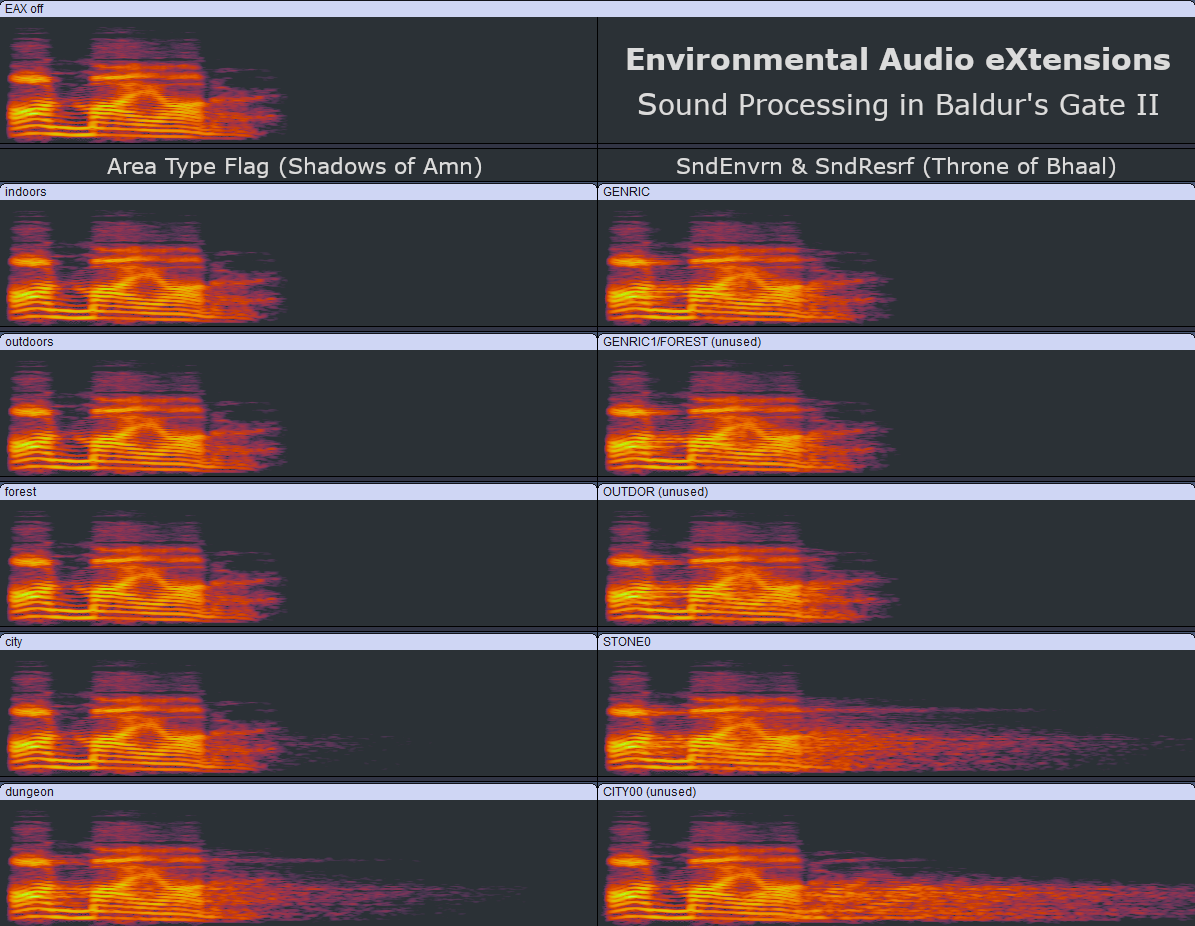
Sound channels
By default, reverb is applied only to sounds from the following channels (defined in SndChann.2da):
- DIALOG: dialogue voices; creature (CRE) soundset non-combat slots (e.g. INITIAL_MEETING, SELECT_COMMON, etc.)
- CHARACT0-5: party members' soundsets
Reverb Mix (Reverb Level) controls the amount of reverb added to sources from other channels:
- ACTIONS: e.g. open/close doors
- SWINGS: weapon combat sounds; creature (CRE) soundset ATTACK slots
- CASTING: spellcasting voices; casting completion (SPL) sounds
- MONSTER: animation (2DA) soundsets; creature (CRE) soundset combat slots (e.g. BATTLE_CRY)
- HITS: combat hit sounds; some special actions (e.g. Thieving Abilities); spell effects using the Play Sound opcode (#174); spell visual (VVC) effects
- MISSILE: projectiles (PRO)
- WALKINGC: PC footsteps
- WALKINGM: NPC/monster footsteps
- ARMOR: armor walking sounds
These channels are always excluded from reverb sound processing:
- NARRATIO: textscreen narrator
- AREA_AMB: main ambients in the songs section; ambients in the ambients section flagged as looping and ignore radius
- GUI: button clicks; inventory and container sounds; some special actions (e.g. Turn Undead and Bard's Song)
- AMBIENTL: ambients flagged as looping
- AMBIENTN: ambients not flagged as looping
Infinity Sounds
The new version of Infinity Sounds will add the 26 environments along with their reference properties based on the official EAX 1.0 specification. The new environments will be defined as custom presets in SndEnvrn.2da and will then be assigned to areas based on their profiles, e.g. dungeon, cave, forest, mountains, city, small room, large hall, etc. This should provide more acoustic variety to the places visited in the game.
You can listen to the sample recordings of the added reverb presets:
Reverb samples
▶️ None
▶️ Generic [0]
▶️ Padded Cell [1]
▶️ Room [2]
▶️ Bathroom [3]
▶️ Living Room [4]
▶️ Stone Room [5]
▶️ Auditorium [6]
▶️ Concert Hall [7]
▶️ Cave [8]
▶️ Arena [9]
▶️ Hangar [10]
▶️ Carpeted Hallway [11]
▶️ Hallway [12]
▶️ Stone Corridor [13]
▶️ Alley [14]
▶️ Forest [15]
▶️ City [16]
▶️ Mountains [17]
▶️ Quarry [18]
▶️ Plain [19]
▶️ Parking Lot [20]
▶️ Sewer Pipe [21]
▶️ Underwater [22]
▶️ Drugged [23]
▶️ Dizzy [24]
▶️ Psychotic [25]
Known issues
- Missing feature: EAX Occlusion is only supported through hardware (e.g. the Sound Blaster Live! sound card), compatible legacy drivers, and native DirectSound (Windows XP or older). DSOAL currently doesn't support EAX Occlusion in BG2. (https://github.com/k...soal/issues/109)
- Engine bug: SaveGame action (autosave) clears the reverb preset loaded on entering an area until the sound processing is paused and resumed, e.g. by opening another GUI screen. Quick saves aren't affected.
- Sound output: With a stereo setup, the output volume of sounds from channels processed by DirectSound3D (with or without reverb) will be about 6 dB quieter when Environmental Audio is on compared to off.
Edited by skellytz, 05 July 2026 - 08:28 AM.