
Jump to content


Photo

Reveal Hidden Gameplay Options

bgee bg2ee iwdee pstee ui enhancement

  • Please log in to reply
9 replies to this topic

#1 Argent77

Argent77
  • Administrator
  • 1457 posts

Posted 14 July 2018 - 02:22 AM

Posted Image

File Name: Reveal Hidden Gameplay Options
File Submitter: Argent77
File Submitted: 14 Jul 2018
File Category: Hidden Options (EE)

A mod that makes a great number of useful game options directly accessible within Enhanced Edition games.

The Enhanced Editions provide a great number of settings that are not directly accessible in the in-game options menu, but instead have to be manually enabled or disabled in the game's configuration file which might discourage less computer-savvy players from using them at all.

This mods adds a number of useful options directly to the game, which includes the (in)famous debug console, various graphics and feedback settings, and more.

Available components:

  • Add in-game option "Enable Debug Mode"
  • Add in-game option "Enable UI Edit Mode"
  • Add in-game option "Show Strrefs"
  • Add in-game option "Hotkeys On Tooltips"
  • Add in-game option "Show trigger icons on tab"
  • Add in-game option "Allow Spacebar in Dialogs" (only available for PST:EE)
  • Add in-game option "Limits druidic spells for Cleric/Ranger" (not available for PST:EE)
  • Add in-game option "3E Sneak Attack"
  • Add in-game option "Critical Hit Screen Shake"
  • Add in-game option "Show extra combat info"
  • Add in-game option "Show Game Date and Time on Pause"
  • Add in-game option "Disable Area Map Zoom" (only available for PST:EE)
  • Add in-game option "Reverse Mouse Wheel Zoom"
  • Add in-game option "Pause Game on Map Screen"
  • Add in-game option "Enable Fog" (not available for PST:EE)
  • Add in-game option "Disable Movies"
  • Add in-game option "No Cosmetic Attacks" (only available for PST:EE)
  • Add in-game option "XP Bonus in Nightmare Mode" (not available for PST:EE)
  • Add in-game option "Trigger Bored Sounds" (not compatible with Lefreut's Enhanced UI (LeUI))
  • Add in-game option "Frame Rate" (experimental) (not available for PST:EE, not compatible with Lefreut's Enhanced UI (LeUI) and K4f4r's Classic BG UI)
  • Add in-game option "Action Feedback" (not compatible with Lefreut's Enhanced UI (LeUI))
  • Add in-game option "Enable Level Up Icon" (only available for PST:EE, requires "Level Up" Icon Tweaks)
  • Add in-game option "Show Area of Effect Range" (not available for PST:EE)
  • Add in-game option "Enhanced Path Search"
  • Add in-game option "Expire Trap Highlights" (not available for PST:EE)
  • Add in-game option "Show Learnable Spells"
  • Add in-game option "Render Search Map"
  • Add in-game option "Render Dynamic Search Map"
  • Add in-game options for Tweak Anthology's "Create Interval Saves" (requires Tweaks Anthology component "Create interval saves")
  • Add in-game option "Force Dialog Pause"
  • Add in-game option for Tweak Anthology's "Restored Loading Hints" (requires Tweaks Anthology component "Restored Loading Hints")
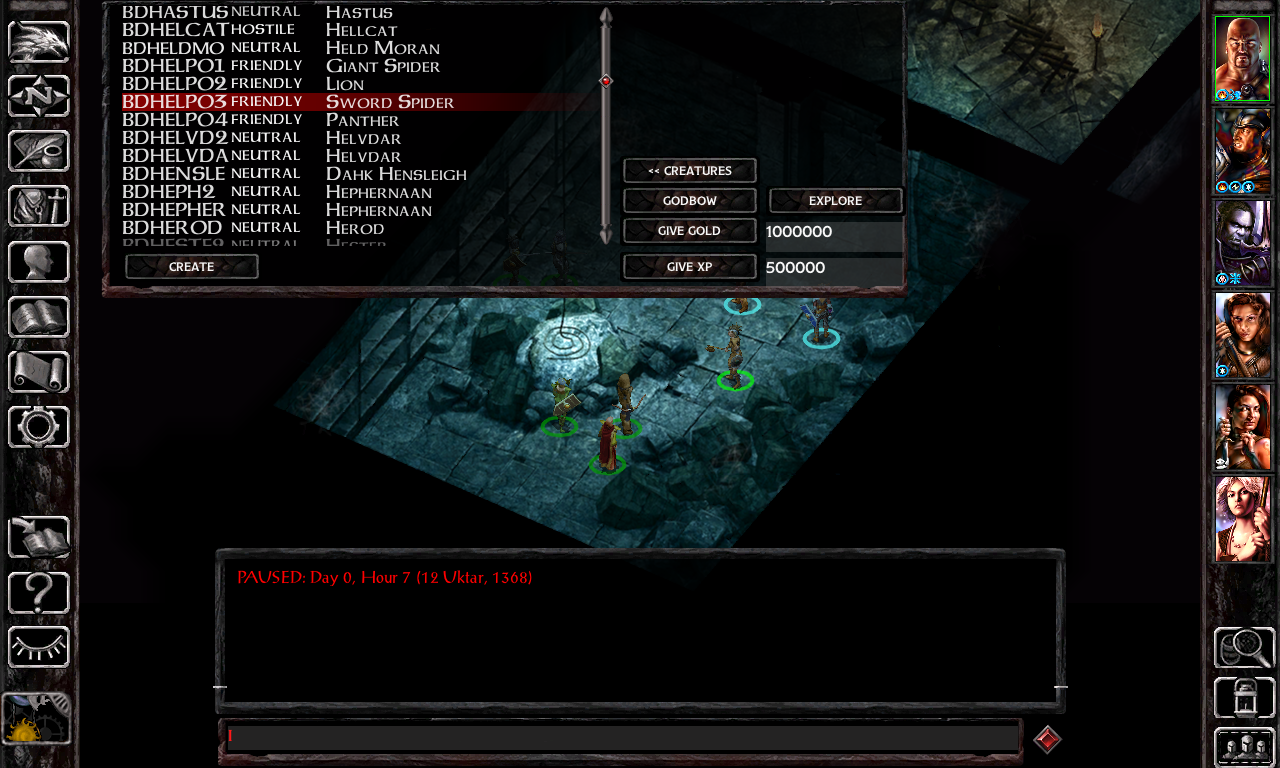
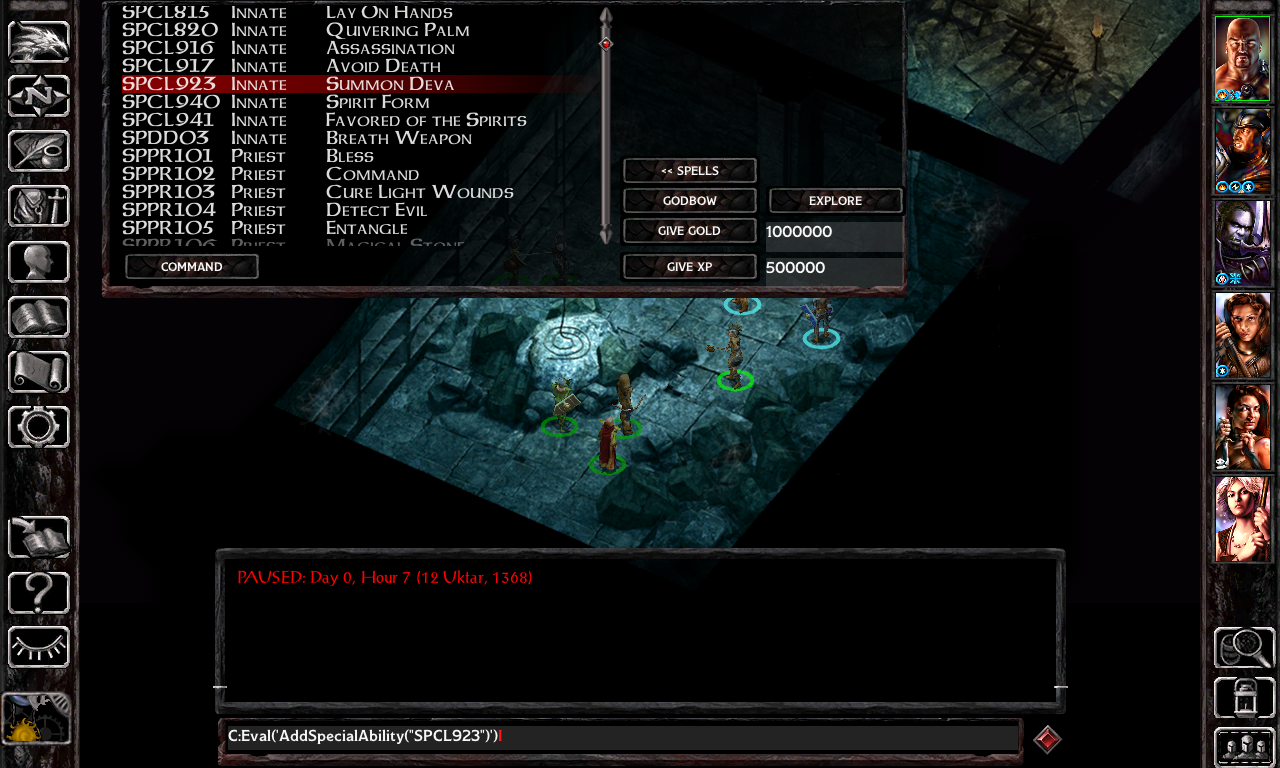
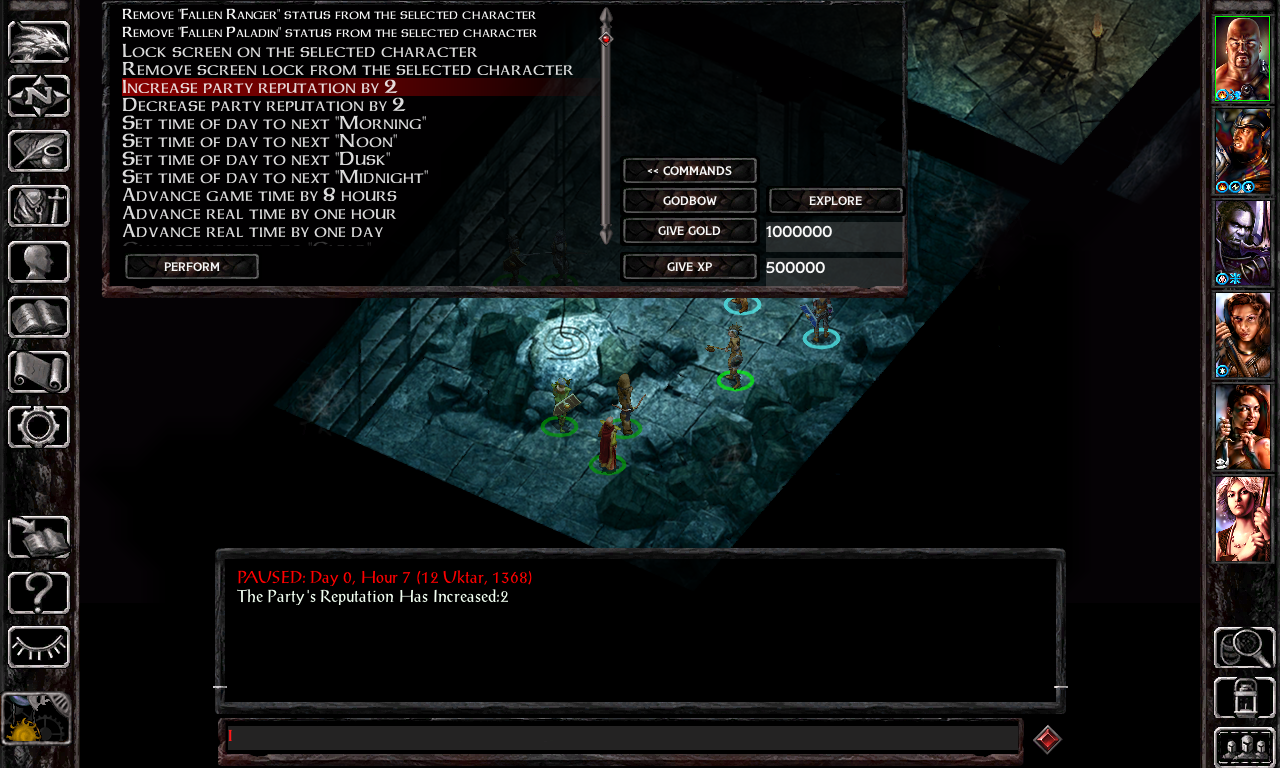
  • Improved Cheat Menu
  • Update resource tables for "Improved Cheat Menu"
  • GUI Improvement: Improved "Death Screen" options
  • GUI Improvement: Improved "Quit Game" options
  • GUI Improvement: Game Menu: Fire animation over SoD logo (SoD and EET only)
  • GUI Improvement: Game Menu: Improved "Quit Game" options (IWD:EE only)
  • GUI Improvement: Game Menu: Improved "Load Game" options
  • Update key bindings for priest and/or mage spells


Click here to download this file
#2 Argent77

Argent77
  • Administrator
  • 1457 posts

Posted 11 September 2019 - 08:34 AM

New version available: Reveal Hidden Gameplay Options v2.4

Full changelog:
  • Added Russian translation (thanks Saigon1983)
  • Added option "Show Learnable Spells"
  • Added option "Expire Trap Highlights"
  • Added option "Enhanced Path Search"
  • Added option "Render Dynamic Search Map"
  • Added option "Render Search Map"
  • Expanded frame rate slider to support 60 fps
  • Fixed several typos in the readme


#3 Argent77

Argent77
  • Administrator
  • 1457 posts

Posted 04 June 2021 - 04:29 AM

New release: Reveal Hidden Gameplay Options v3.0

This release adds the game option "Force Dialog Pause" to the in-game options menu. Additionally you can recreate the key bindings for priest spells and/or mage spells. This option can be useful for custom spells added by mods or game spells that are not listed in the unmodded game.

Changelog:

  • Added option "Force Dialog Pause"
  • Added multiple choice option "Update keybindings for priest and/or mage spells"
  • Improved conditions for installing game options


#4 Argent77

Argent77
  • Administrator
  • 1457 posts

Posted 12 March 2023 - 11:20 AM

New release: Reveal Hidden Gameplay Options v4.0

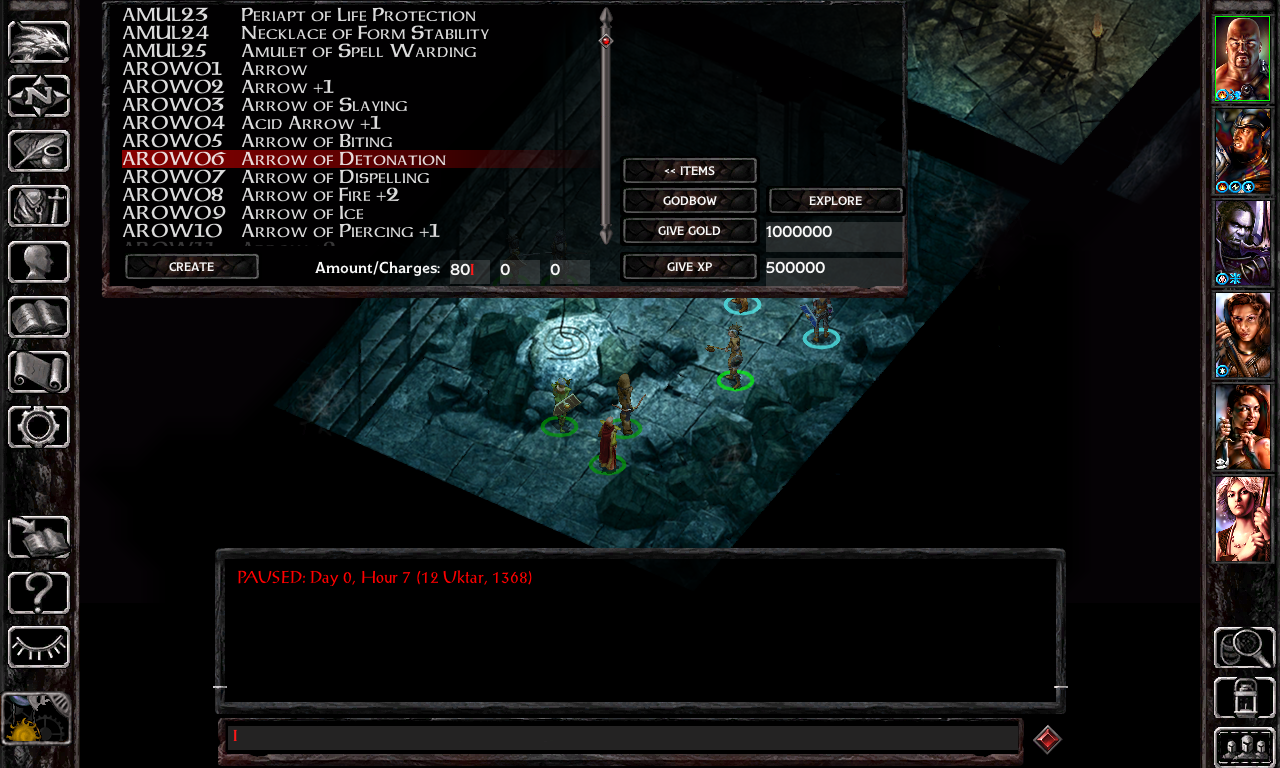
This version adds a new component that greatly expands the cheat menu. In addition to the list of areas, it is now possible to create items or spells, open stores, spawn creatures or execute a selected number useful cheat commands. It is fully compatible with popular UI mods, such as lefreut's Enhanced UIs, Pecca's Dragonspear UI++ or Tipun's User Interface.

Screenshots:

Spoiler


Changelog:

  • Added new components "Improved Cheat Menu" and "Update resource tables for Improved Cheat Menu"
  • Added labels for Project Infinity
  • Fixed potential keybinding issues in PST:EE caused by the "Update keybindings" component


#5 Argent77

Argent77
  • Administrator
  • 1457 posts

Posted 26 March 2023 - 11:47 PM

New release: Reveal Hidden Gameplay Options v4.1

Changelog:
  • Updated Russian translation (thanks yota13)


#6 Argent77

Argent77
  • Administrator
  • 1457 posts

Posted 09 December 2023 - 03:14 AM

New release: Reveal Hidden Gameplay Options v4.5

Changelog:
  • Added compatibility with Pecca's Infinity UI++
  • Added Simplified Chinese translation (thanks Lewis Liu)
  • Updated Russian translation
  • Fixed positioning of Action Feedback slider in Dragonspear UI++
  • Improved installation feedback for the "Install all" component


#7 Argent77

Argent77
  • Administrator
  • 1457 posts

Posted 21 January 2024 - 06:04 AM

New release: Reveal Hidden Gameplay Options v4.6

Changelog:
  • Updated Simplified Chinese translation
  • Updated Project Infinity metadata


#8 Argent77

Argent77
  • Administrator
  • 1457 posts

Posted 10 March 2024 - 04:25 AM

New release: Reveal Hidden Gameplay Options v4.7

Changelog:
  • Fixed potential placement issues of frame rate slider if Dragonspear UI++ is installed


#9 Argent77

Argent77
  • Administrator
  • 1457 posts

Posted 26 October 2025 - 02:57 AM

New release: Reveal Hidden Gameplay Options v5.0

Changelog:

  • Restructured mod components and added component groups
  • Added Spanish translation (thanks alaisFcZ and IOVIVO)
  • Added new group "GUI Improvements" with various minor visual and usability improvements
  • Added option for Tweaks Anthology's "Restored Loading Hints"
  • Improved compatibility with Infinity UI++
  • Improved Frame Rate slider: increment in steps of 5 between 10 and 60 fps
  • Changed several harmless warning messages back to regular messages at mod installation


#10 Sergio

Sergio
  • Member
  • 959 posts

Posted 31 January 2026 - 02:03 AM

This is a really cool mod, with a couple of flaws (or at least they feel so to me).

When I read in the changelog that you "restructured mod components and added component groups",
I thought that finally, the most "used" and "popular" components were moved first, so during the install they would be the first components to be proposed to be installed to the player.

They aren't.

Also, I do not think component groups are needed for this mod (it's not huge enough to warrant them, or at least that's my idea) and I'm perplexed about options in mods that do not do what they suggest (e.g: Install all Hidden Gameplay Options at once doesn't actually install everything: If it's called "install everything" it should install everything).
 

A few more things: 

1) I don't think the groups are that needed, but this is subjective, so no problem.

2) I would love for the following options to be moved first, because I'm pretty sure they are the most popular and reasonable for the players:
 

2. Add in-game option "Enable Debug Mode"
8. Add in-game option "Limits druidic spells for Cleric/Ranger"

3) Some other tweaks that I think warrant a thought about being put first:
1. Improved "Death Screen" options
2. Improved "Quit Game" options
5. Game Menu: Improved "Load Game" options
 

4) For the following option I've got some doubts:

E.g: 25. Add in-game option "Enhanced Path Search" (From the readme: Improves pathfinding by continuously recalculating the search path of characters. Option can be found in Gameplay section): how does it work? Is it the equivalent of changing the pathfinding value inside the .ini file - and does that work as well in EE, or is it placebo? Is it compatible with Bubb improved pathfinding?


Said this, I've been using the .ini you've released once on Beamdog forums for 3.0 that puts the components I highlighted first - I can't appreciate all the work you've been doing for 5.0, because I still use 3.0 for a very simple reason: doing a manual install every time and having to continuosly click N Y S takes his toll and I wish to have the fewer clicks possible.


Edited by Sergio, 31 January 2026 - 07:19 AM.

Low hung brow, dazed look on your face..... It appears that you are correct, my friend. You are indeed a complete imbecile.


Also tagged with one or more of these keywords: bgee, bg2ee, iwdee, pstee, ui, enhancement